
One Click Google Directions to a GoldMine Contact
If you liked my article on using the GM+View tab to get directions to your contacts via Google maps, you’ll like this little trick.
While maps and other information in GoldMine’s GM+View tab is great, it is sometimes a bit trapped there. If you’ve tried to copy and paste, tab between fields, print directions, etc. from there, you know what I mean. That’s why I went ahead and made a taskbar shortcut for directions. When pressed, the button opens a browser window and passes the start and end-points to Google maps and their great tool does the rest.
To do this yourself, simply right-click on the taskbar (that Outlook-ish toolbar on the left side of the GoldMine window in GoldMine 5.7 and higher) and select Add New Item… When the window comes up, fill it in like this:
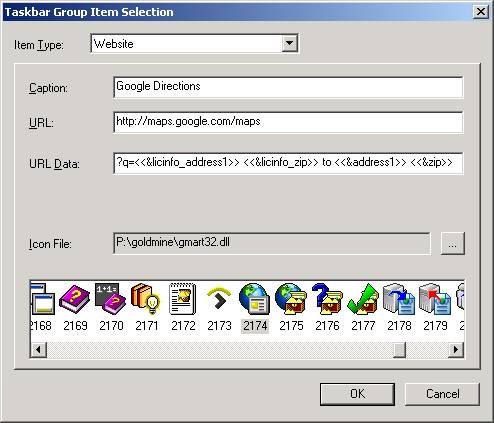
Note that the spacing on the URL Data line is very important so you might want to just copy and paste this for that part:
?q=<<&licinfo_address1>> <<&licinfo_zip>> to <<&address1>> <<&zip>>



clskehan
Is there a way to save the results to a file when accessing web pages this way?
clskehan
Is there a way to add a print command or save to file command when accessing websites this way.
Doug Castell
Keep in mind that this will be pulling your address information from your license file. To review (or update) the info you entered, go to File|Configure|License Manager and then to the registration tab. If, in your address 1 line there, you have a pound symbol (#) or an ampersand (&), try to move those to line 2 of the address and they’ll mess with the URL formatting and probably cause these view/links (and those for mapquest, yahoo maps, etc.) to not work properly. The same holds true for your contact records themselves. Try to make it a practice to put the Suite #123 on address line 2 instead of at the end of line 1 and your links of this nature will work much better.
As for the GM+Views area, the biggest thing people overlook when pasting in my sample views is to hit the <H> button before they paste the html. There is already HTML in there when you create a new view. You’re pasting HTML, not friendly test, so you’ll want to be in the appropriate mode before you paste. Hope this helps out! If not, give me a call as I do offer fee-based consulting services and, given my experience with these particular problems, I’m sure i could knock them out quickly..
Glenn
I have never worked w/the GM+view and would like to use the google maps along w/the task bar shortcut, but I apparently am missing something. Neither one works for me. Can you help me set this up? When I use the task bar it just takes me to google maps. and the GM+view only shows text w/a partial link.
Thanks,
Glenn